
Adding new feature to context menu for AOT objects in AX 2012

Instead of manual changing it in Tools->Options form, we would like have a possibility to setup it when we right click over the project’s object in Projects window. This could be done in a few steps described below.
Create the class with the feature’s code. To make a solution bit a flexible let’s assume that updating the startup project will be first of several additional features.
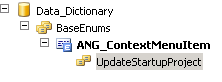
Prior to creating class we will create the base enum for menu items:
ANG_ContextMenuItem with element UpdateStartupProject:
Now let’s create the class ANG_ContextMenu with method openStartupProject:
class ANG_ContextMenu
{
}
public static ANG_ContextMenu construct()
{
return new ANG_ContextMenu();
}
public static void main(Args _args)
{
ANG_ContextMenu contextMenu = ANG_ContextMenu::construct();
if (_args.parmEnumType() == enumNum(ANG_ContextMenuItem))
{
contextMenu.run(_args);
}
}
public void run(Args _args)
{
switch (_args.parmEnum())
{
case ANG_ContextMenuItem::UpdateStartupProject :
this.updateStartUpProject(_args);
break;
}
}
private void updateStartupProject(Args _args)
{
UserInfo userInfo;
UtilElementName startupProj;
SysContextMenu contextMenu;
TreeNode treeNode;
if (SysContextMenu::startedFrom(_args))
{
contextMenu = _args.parmObject();
treeNode = contextMenu.first();
startupProj = treeNode.treeNodeName();
update_recordSet userInfo
setting StartupProject = startupProj
where userInfo.id == curUserId();
}
}
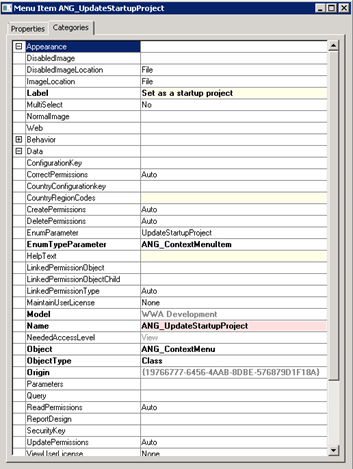
Create the menu item ANG_UpdateStartupProject for the feature with the properties as is displayed below:
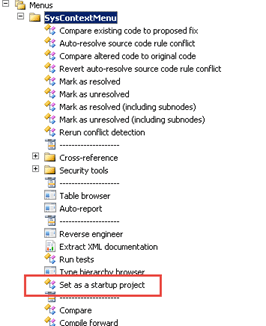
Add the menu item to SysContextMenu menu:
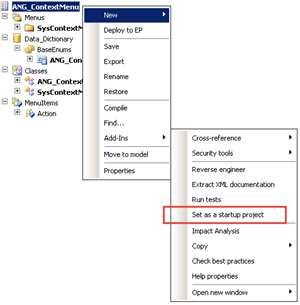
So now it could be visible in context menu:
In the SysContextMenu class we need to modify method verifyItem() to prevent running the feature for other types of AOT objects. We can achieve this by adding below code to the last switch clause in the method:
case menuitemActionStr(ANG_UpdateStartupProject):
if ( firstNode.handle() == classNum(ProjectNode) && //Only launch from project node
match(#pathProjects,firstNode.treeNodePath()))
{
return 1;
}
return 0;
So now we have a new menu item in context menu with possibility to add other usable features in a simple way.
See more

AGA pomaga – poznaj inteligentnego asystenta do przetwarzania zapytań ofertowych: ANEGIS Generative Assistant


Jak z pomocą narzędzi Power Platform, Microsoft Fabric i AI zrealizować plan na cyfrową transformację? ANEGIS Power Center

Obowiązkowy KSeF startuje za 4 miesiące! Umów się na bezpłatne konsultacje i przygotuj swój system na zmiany
Looking for a Microsoft partner? Let's talk about your project
Work with a team that has delivered implementations and projects for dozens of companies. Schedule an introductory call and see:
How to tailor Dynamics 365 to your company's processes, rather than the other way around
Which areas are worth automating to save time and reduce costs
Here is the step-by-step implementation process with Anegis: from analysis to post-launch support




